A comment mode for hover states.
Topic
Tools & Plugins
Tags
- Claude Code
- Open Source
- AI
Built with
Okay so imagine this. I'm building Canopy, and there's a row in the parks list that looks a bit off when I hover over it. Too faint. Tiny thing.
So I go to point Claude at it. There's a tool for that. You hit "select", then you click the thing on the page. Easy. Except the second I moved my mouse over to hit "select", the hover was gone.
Like, of course it was. It's a hover. It only exists while my mouse is sitting on it. I was trying to take a photo of something that disappears every time I reach for the camera.
So I asked Claude a small question. How do I keep a hover on screen?
And then it hit me. In Figma I move my cursor around, every layer lights up, I click one and leave a comment. That's the whole workflow. So why can't I do that on the REAL page? And why can't those comments go straight to Claude?
By the end of the evening, I could.
Point, click, complain
It's called page-comments, and it's a skill for Claude Code. A skill is basically a little add-on. You set it up once and then use it everywhere.
Here's how it goes. I press Shift+C on any page. A thin yellow frame shows up around the whole thing, which is how I know comment mode is on. Then I just move my mouse. Whatever is under it gets outlined and named, like layers in a design tool.
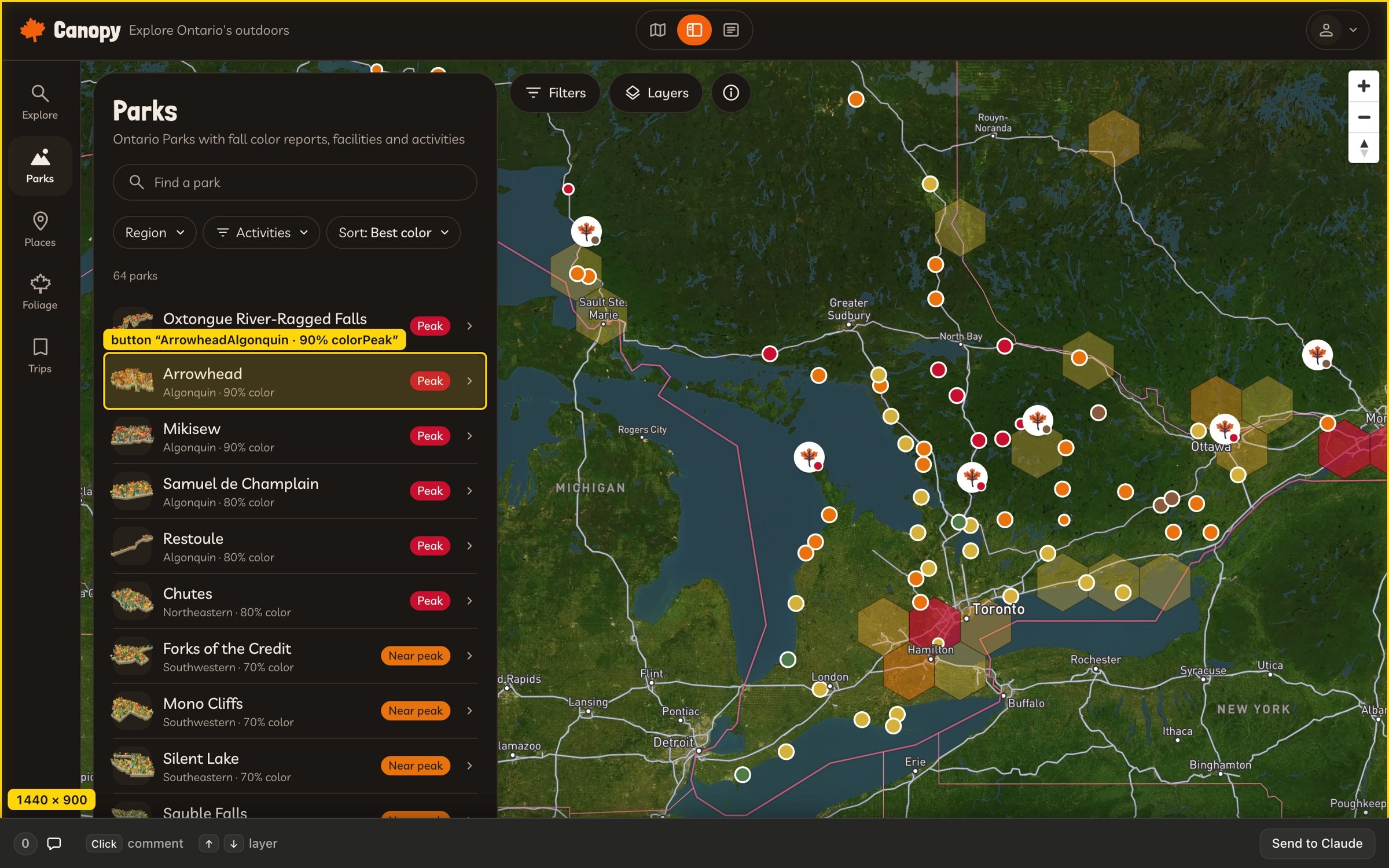
And look at that row. It's hovered. It STAYS hovered. The problem that started this whole mess basically solved itself. Comment mode starts from a key press and not a click, so whatever I'm hovering when I press it just stays like that. I can click it like anything else. My first real note was on a hover state.
Then I click and type what's bugging me.

Every note leaves a little numbered pin behind. Click a pin and the note opens back up, so I can edit it or delete it. And when I'm five comments deep and can't remember what I already said, the count in the bar opens a list of all of them.

Then I hit Send to Claude. The notes land in my Claude Code chat, each one with the thing it's about, and Claude starts working through them.
And each note carries a bit of luggage with it.
What travels with a note | Why |
|---|---|
The thing I clicked, and its text | So Claude knows which "this" I mean |
The page and the window size | Because "it's broken" on a phone and "it's broken" on a laptop are two different problems |
Light or dark theme | Same reason |
Whether it was a hover state | The whole reason I'm here |
On React projects, the component it belongs to | That's how Claude finds the code behind it |
No screenshots get attached, by the way. It's just my words and those details. Turns out that's enough.
Wait, a web page can't talk to Claude
Here's where I had to stop and figure something out. A web page can't message Claude. Like, at all. It's sealed off from the app around it. So I've got this lovely Send button, and it has nowhere to send anything.
The answer is a tiny listener that Claude runs on my own laptop. Imagine a mailbox sitting right outside the page. The Send button drops my notes in the mailbox, and the mailbox hands them to my Claude session. It only takes mail from my own machine, and only with a private token.
And nothing gets added to the project I'm reviewing. The whole thing sits on top of whatever page is open in the browser. So it works on Canopy, on a staging site, on anything.
It worked. It also looked wrong.
Fun fact. This started life as a tool inside the Canopy project. Then I went, hold on, I want this on EVERY project. So that same evening it got rebuilt as its own standalone thing.
And the first version? It worked, and it looked wrong. So I did what I do. I said what bothered me, one thing at a time.
The frame was too thick. It went thin.
The bar floated in the middle. It went edge to edge and took on Claude's own colours.
There was a Done button nobody needed. Deleted, along with a bunch of labels.
Pins were just decoration. Now you can click them.
Clear got an Undo, for when I wipe all my notes by mistake.
At one point the buttons ran right off the edge of the bar in a narrow window. I said so. It got fixed. Now it fits on a phone.
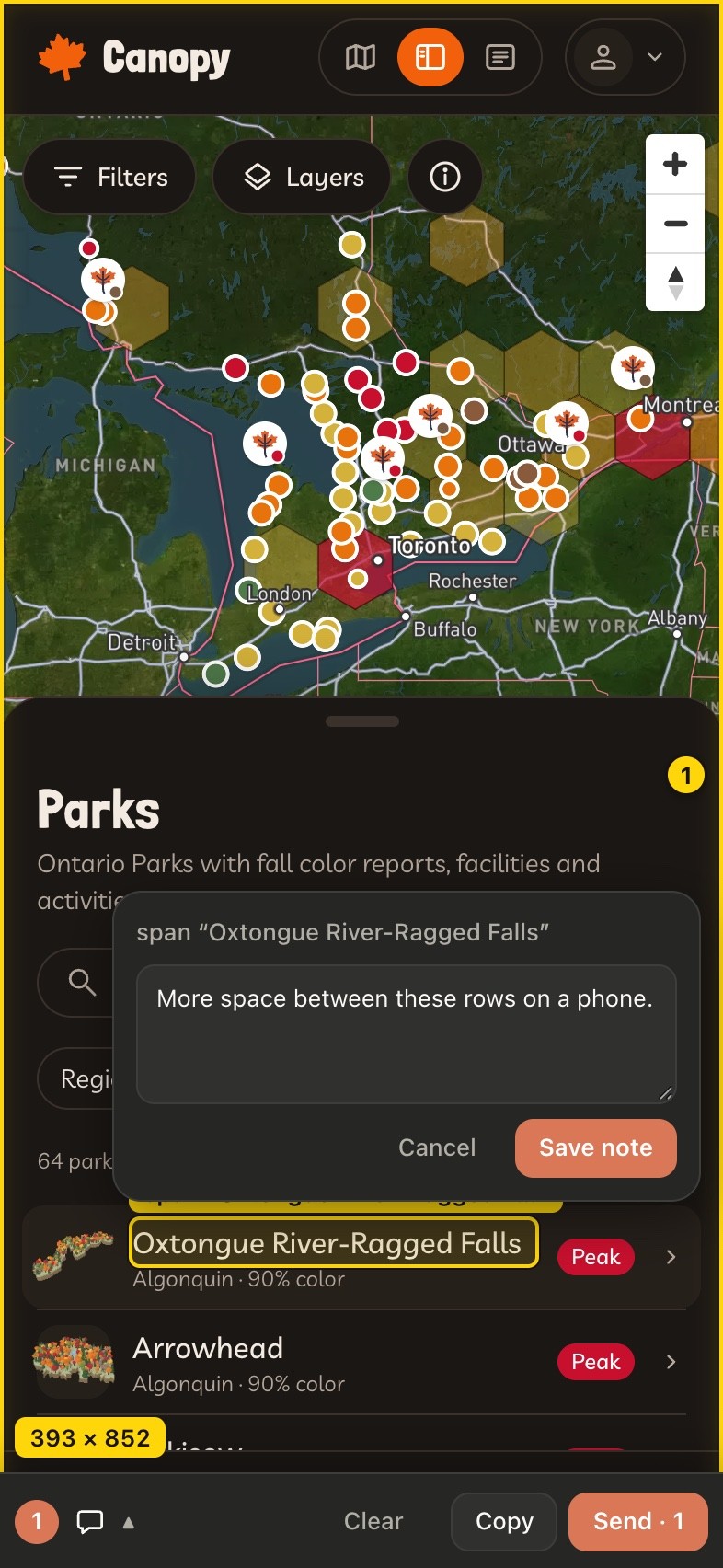
That loop is the bit I keep coming back to. I wasn't writing a spec. I was reacting to something in front of me, the way I would with a designer sitting next to me.
What it can't do (yet)
The thing | What happens |
|---|---|
Anything drawn inside a canvas, like Canopy's map | It counts as one big element. I comment on the whole map and describe the spot. |
Content embedded from another site | Can't reach it |
Really locked-down sites | Some of them block it |
Reloading the page | Comment mode switches off. My notes are kept though. |
Also, real talk. So far it's only been used by me, in Claude Code's own browser. I built a bookmark so it can run in Chrome and Arc too, and I still need to put that through its paces.
It's up on GitHub if you want to try it. One line and it's yours. Fair warning, you'd be tester number two.
But I'm keeping it. Most of my feedback on a build is "this, here, is slightly off". And typing that into a chat means describing where "here" is.
Now I just point.
Keep reading